Client systems
A welcoming storefront. A working back room.


CLIENT SYSTEMS · 2026
A custom farm website and owner workspace for products, order requests, inventory reservations, and publishing.
A farm website should feel personal: the produce, the seasons, and the work behind them. It also needs to be useful when someone wants to buy something.
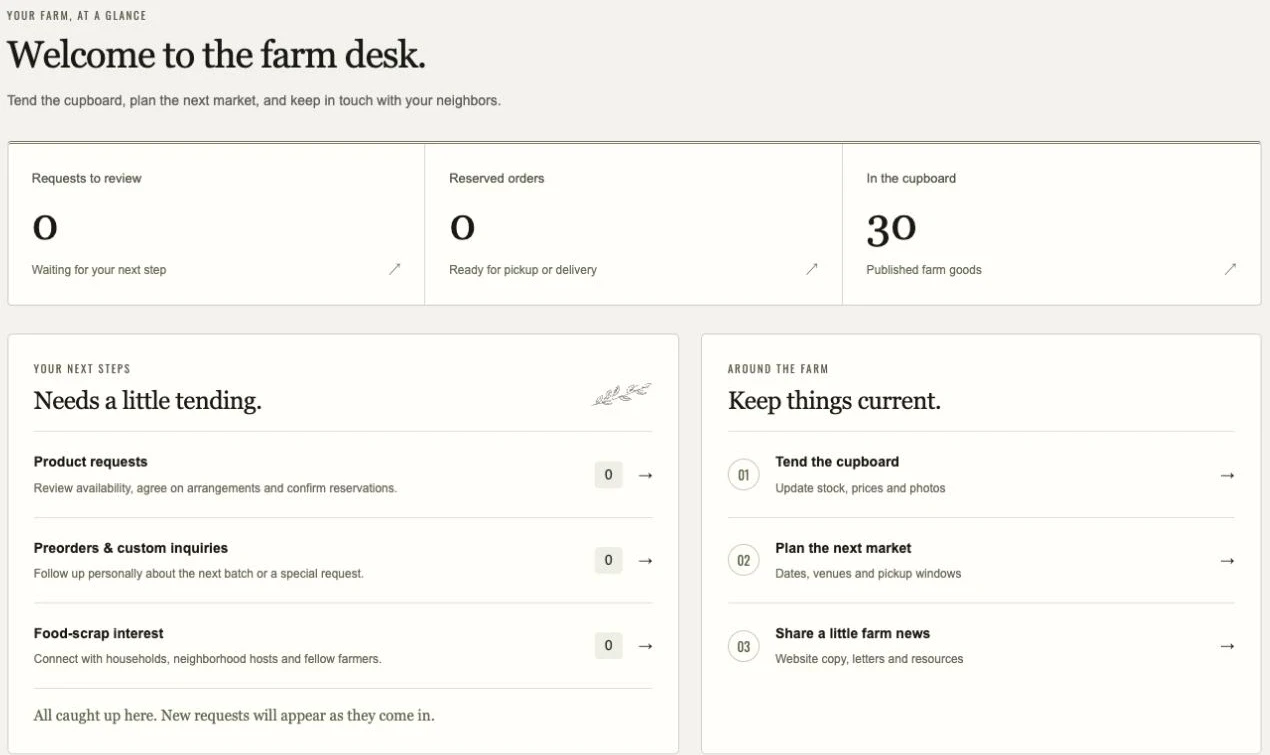
I built both sides: an illustrated public storefront and a private Farm Desk for the owner to manage products, stock, requests, reservations, and content.
Client systems
A welcoming storefront. A working back room.
The story brings people in. The desk helps the owner keep their promises.
THE NEED
A small farm’s website has to tell its story and handle the less picturesque details: what is in season, how much is available, what a customer requested, and which orders are actually reserved. The owner needs a manageable way to keep all of that current.
I designed the public site and built the connected owner tools, including the basket, request and quote flow, inventory rules, product publishing, and fulfillment history. The system follows the farm’s reviewed ordering process rather than assuming every purchase belongs in an instant checkout.
02 · THE MAKING
An illustrated storefront brings seasonal products together with the farm’s story, market dates, journal, and useful resources. Product pages make room for sold-out items, preorders, and custom requests.
The private workspace brings product details, photos, stock, customer requests, events, and content together. Draft edits can be prepared without replacing what visitors currently see.
A request or quote does not hold inventory. The owner records verified payment before confirming a reservation, with an explicit exception for agreed pay-in-person orders. Available stock is checked when the reservation is made.
Fulfillment deducts stock once; cancellation releases the reservation. Paid cancellations flag the need to arrange a refund manually. The desk keeps those actions visible alongside the order history.
WHAT CHANGED
BUILT WITH
Astro · React · Cloudflare Workers · D1 · R2
Last reviewed October 2026